ToggleBar
Utility · Free/PaidSettings that took several steps,
now just one click.
Turn on and off settings that normally take several steps in System Settings, right from the menu bar.
ToggleBar reads the current state of each setting and shows it as a switch,
so you never have to open System Settings just to check.
Key Features
Run Right from the Menu Bar
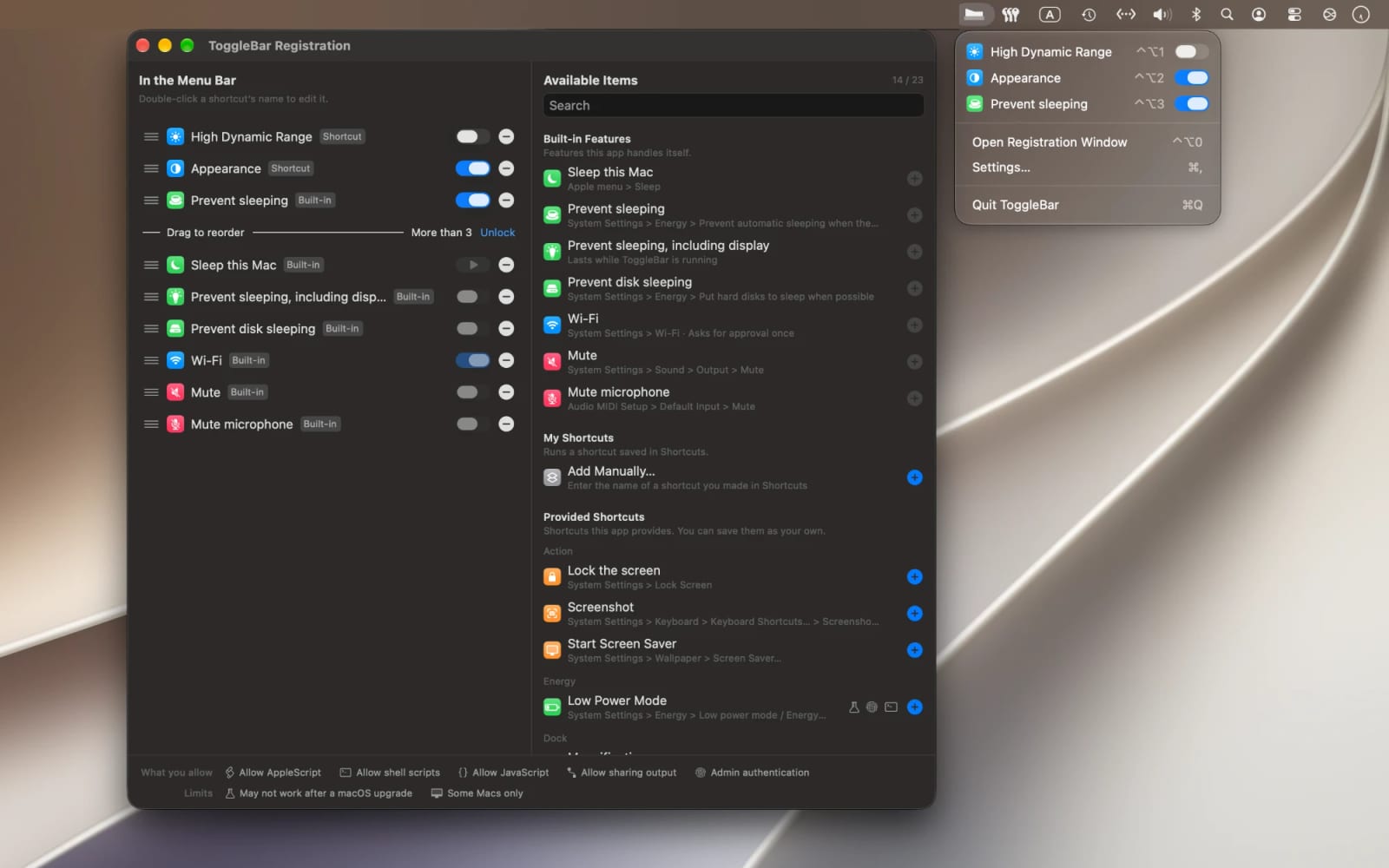
Your items are listed under the menu bar icon, and the one you choose runs immediately.
Current State as a Switch
Settings you turn on and off appear as switches; one-time actions such as Lock the screen appear as run buttons.
Built-in Features
ToggleBar itself handles Sleep this Mac, Prevent sleeping (also for the display or disks), Wi-Fi, Mute and Mute microphone.
Provided Shortcuts
Appearance, High Dynamic Range, True Tone, Night Shift, Do Not Disturb, Low Power Mode, six Dock settings, automatically hiding and showing the menu bar, Lock the screen, Screenshot and Start Screen Saver. Add them to Shortcuts with a single button.
Add Your Own Shortcuts
Add shortcuts you made in Shortcuts by name. A shortcut that outputs the text “true” or “false” appears as a switch; any other shortcut appears as a run button.
Run with a Hotkey
Press your main hotkey with a number to run any of the top nine items in the menu, or with 0 to open the Registration Window.